Sumbreak Solver: Daily LinkedIn Sumbreak Calculator
Free instant step-by-step Sumbreak solver and answer calculator for LinkedIn's daily Sumbreak puzzle. Input your numbers below for the winning merge sequence.
Interactive 3×3 Sumbreak Grid
About LinkedIn Sumbreak & Algorithmic Solver
Welcome to Sumbreak Solver, the premier step-by-step calculator and daily puzzle companion for LinkedIn's viral number-merge game, Sumbreak. Whether you are stuck on today's official LinkedIn challenge or looking to train on endless custom boards, this free solver calculates the exact sequence of legal adjacent merges required to reduce any grid down to a single winning tile.
The game is a daily logic and arithmetic puzzle hosted on the LinkedIn Games platform, joining popular favorites like Queens, Pinpoint, Tango, and Crossclimb. The objective is both elegant and mentally stimulating: players are presented with a numbered grid and must systematically combine adjacent identical numbers until only one final tile remains on the board. Because official rules dictate that empty squares act as immovable barriers where numbers cannot slide, planning your merge path in advance is essential to avoid deadlocks and isolated orphan tiles.
With Sumbreak Solver, you can input any 3x3 daily puzzle or custom board layout into our interactive grid. Within milliseconds, our automated algorithm explores every permutation of the board state space and produces an optimized, move-by-move visual solution.
How to Use Sumbreak Solver to Solve Any Board
Solving your daily Sumbreak puzzle takes just three straightforward steps using our free Sumbreak calculator:
Step 1: Input Your Daily Sumbreak Numbers
Examine your current Sumbreak game on LinkedIn. Click any cell on our interactive grid above, then tap the corresponding number from the quick keypad (2, 4, 8, 16, 32, 64, 128, 256, 512). The active selection cursor automatically advances across the row, allowing you to fill your entire 3x3 board in seconds.
Step 2: Calculate the Optimal Sumbreak Merge Path
Once your numbers match your daily puzzle, click the 'Solve Sumbreak Board' button. The built-in solver algorithm runs an exhaustive breadth-first search (BFS) directly inside your web browser. In under 15 milliseconds, our solver identifies the fastest sequence of valid neighbor merges to reduce the board to a single tile.
Step 3: Follow Step-by-Step Sumbreak Instructions
Use the playback controls (Previous, Next, or Auto Play) to view the animated merge sequence. Each step clearly highlights the origin tile (marked FROM) and the target destination tile (marked TO). You can also review the complete move list below the board to complete your daily challenge in record time.
Real Sumbreak Solver Walkthrough Example
To understand how our Sumbreak solver analyzes number combinations, consider a typical puzzle scenario. In the visual diagram below, notice how two adjacent tiles with the value 4 are positioned next to each other on the top row of the grid.
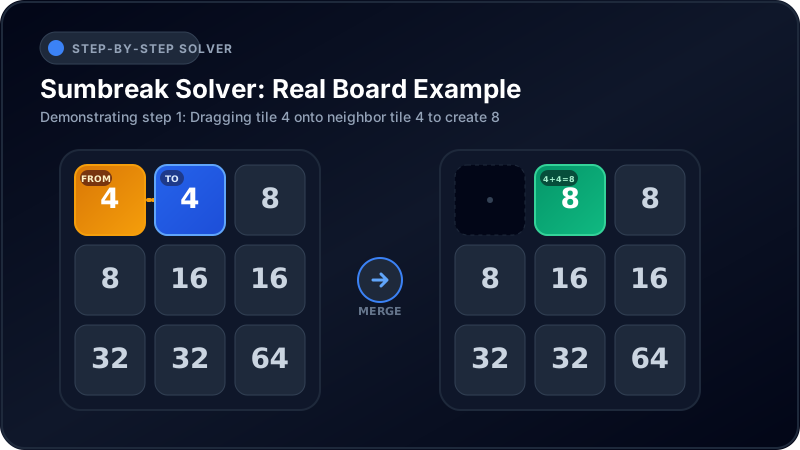
When you drag the first tile 4 onto the adjacent tile 4, they combine into their mathematical sum (4 + 4 = 8). The newly created number 8 occupies the destination cell, while the origin cell is permanently cleared. The solver algorithm specifically verifies whether placing the new tile 8 at that location will allow future merges with neighboring 8s, 16s, or 32s, ensuring that no tile becomes an unreachable orphan island.
Everything You Need to Know About Sumbreak Solver
Here are direct, authoritative answers to the most common questions players ask about Sumbreak and our Sumbreak calculator:
What is Sumbreak Solver?
Sumbreak Solver is an automated web application and algorithmic calculator built specifically for the daily LinkedIn Sumbreak puzzle. It analyzes any 3x3 or custom grid, verifies mathematical solvability, and provides an interactive step-by-step guide showing exactly how to collapse the puzzle to a single number.
How Does the Sumbreak Solver Algorithm Work?
The solver engine models each game as a directed state graph. At each step, it identifies all valid horizontal and vertical merges between identical neighboring numbers. Using state memoization and breadth-first search, Sumbreak Solver explores all valid branches to find the guaranteed shortest path to victory, eliminating dead ends before they occur.
How Much Does Sumbreak Solver Cost?
Sumbreak Solver is 100% free with no hidden charges, token limitations, or paywalls. Both the daily calculator and the unlimited practice mode are free for all puzzle enthusiasts worldwide.
Do I Need a Subscription to Solve Sumbreak?
No. You do not need an account, a paid subscription, or a LinkedIn login to use Sumbreak Solver. All calculations occur locally in your web browser, ensuring zero registration friction and complete user privacy while solving your daily puzzle.
How Fast Does Sumbreak Solver Deliver Results?
Sumbreak Solver computes complete winning solutions in less than 15 milliseconds. Because the solver algorithm executes client-side on your device, there are zero server wait times or network delays when solving your game.
Top Strategies to Master the Daily Puzzle
While Sumbreak Solver can solve any board automatically, learning core gameplay strategies will help you improve your daily performance and master number puzzles independently:
1. Plan Sumbreak Merge Directions Ahead
In this game, dragging tile A onto tile B produces a completely different board state than dragging tile B onto tile A. Always check which position will have valid matching neighbors in subsequent rounds before committing to a move.
2. Avoid Isolated Sumbreak Island Tiles
Because numbers do not fall or slide into empty slots, empty squares act as permanent walls. Merging two tiles in a way that cuts off a remaining number from all adjacent cells will cause an immediate game over. Always preserve connectivity across the grid.
3. Identify Unique Value Pairs in Sumbreak Early
Scan your board for numbers that appear only twice or cannot be formed through other combinations. These unique pairs must eventually meet, meaning your strategy should gradually bring them together while clearing intermediate obstacles.
4. Work Backwards from the Largest Target Sumbreak Tile
Every completed game finishes with a single high-value tile (such as 64, 128, or 256). By visualizing how smaller numbers must double to reach that final sum, you can establish the correct hierarchy of merges.
5. Practice with Unlimited Sumbreak Puzzles
LinkedIn limits players to a single Sumbreak puzzle per day. Use our Unlimited Sumbreak Practice mode to generate endless 100% solvable random Sumbreak boards across Easy, Medium, and Hard difficulties to sharpen your mental math and spatial reasoning.
6. Master Power-of-Two Number Progressions
The puzzle revolves around binary geometric progressions (2, 4, 8, 16, 32, 64, 128, 256, 512). Recognizing at a glance how many baseline tiles of value 2 or 4 are needed to construct a target value of 64 or 128 allows you to evaluate whether a proposed merge path is mathematically viable.
Frequently Asked Questions
What is the difference between Sumbreak and 2048?
While both games involve doubling numbers through addition, 2048 slides all tiles across the board with every swipe and spawns new numbers randomly. In contrast, Sumbreak is a pure static deduction puzzle where tiles never slide, empty spaces remain permanent, and no new tiles ever appear during standard play.
What time does the LinkedIn puzzle reset daily?
The official LinkedIn Sumbreak puzzle resets every day at midnight local time. If you finish your daily game and want to continue playing, visit our Unlimited Sumbreak Practice mode for infinite daily-style boards.
Can a Sumbreak puzzle be impossible to solve?
Official daily Sumbreak puzzles published by LinkedIn are curated and verified to have at least one valid winning path. However, random custom boards entered into a calculator may be unsolvable if odd number distributions prevent complete reduction. Sumbreak Solver automatically verifies whether a solution exists before guiding you through the steps.
Where can I play the official Sumbreak game?
You can play the official Sumbreak game directly on LinkedIn Games via your web browser or the LinkedIn mobile app. Our Sumbreak solver acts as an educational companion to help you learn optimal strategies and analyze challenging puzzle boards.
Can I play Sumbreak without a LinkedIn account?
Yes, you can play unlimited free number-merge puzzles right here on Sumbreak Solver using our dedicated Practice mode, featuring three difficulty tiers with zero registration required.